Head-to-head
Coinbase vs Coinbase Advanced (Formerly Pro): Same Account, Different Fees
Coinbase Pro no longer exists: Coinbase announced in June 2022 that it would replace Pro with Coinbase Advanced, moved Pro balances into regular Coinbase accounts, and kept Pro statements available only until the end of 2023. So "Coinbase vs Coinbase Pro" today really means the simple Coinbase buy screen vs Coinbase Advanced, inside the same account. Advanced is cheaper for almost every trade, because it charges a maker or taker fee with no spread, while the simple screen adds a spread and a separate fee. The simple screen still suits a first small purchase, or a member of the paid Coinbase One plan buying within its fee-free allowance.
Everything below comes from Coinbase's own help and pricing pages, read on 9 October 2026, plus one dated vendor comparison. Coinbase links on this page are affiliate links; the advice to use the cheaper screen is the same either way.
Short answer: Pro was replaced by Advanced
If you used Coinbase Pro years ago, your money did not vanish. Coinbase's transition page explains that it moved Pro balances to Coinbase in phases, cancelled any open Pro orders during the move, and kept whitelisted addresses and linked bank accounts the same. Former Pro users sign in to Coinbase with the same username and password. Pro's own account stopped taking deposits, withdrawals and trades once balances had moved.
Coinbase also said Advanced would keep Pro's "same low volume-based" pricing, with no subscription or extra fee for using it. In other words, the cheaper trading screen did not go away; it moved inside the main app. That is why so many older comparisons are wrong. They describe Pro as a separate exchange you have to join, which has not been true for years.
Fee comparison on the same trade
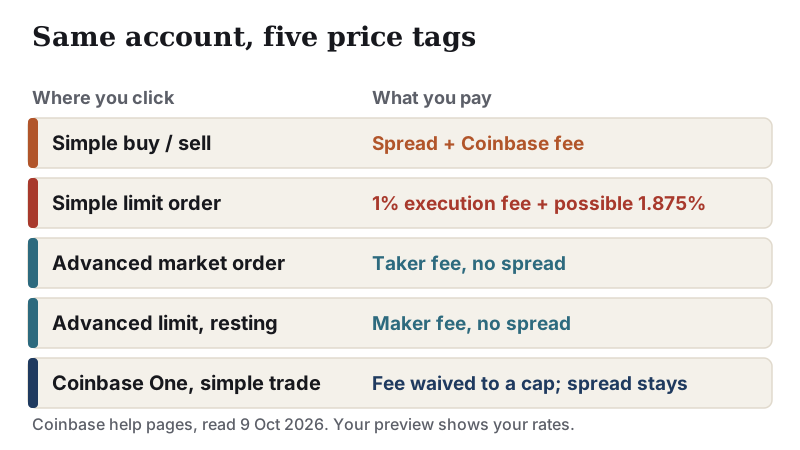
Coinbase's pricing disclosure lays out the difference plainly. On a simple buy or sell, Coinbase includes a spread in the quoted price and charges a Coinbase fee on top, set by your payment method, order size, asset and location. On Advanced, "no spread is included", because you interact directly with the order book, and you pay a maker or taker fee instead.
Coinbase does not publish one percentage for the simple-screen fee, and its Advanced tier table is only visible to signed-in users, so we will not print rates we could not read. The best public side-by-side we found is Robinhood's quote comparison, which naturally favours Robinhood but includes both Coinbase screens.
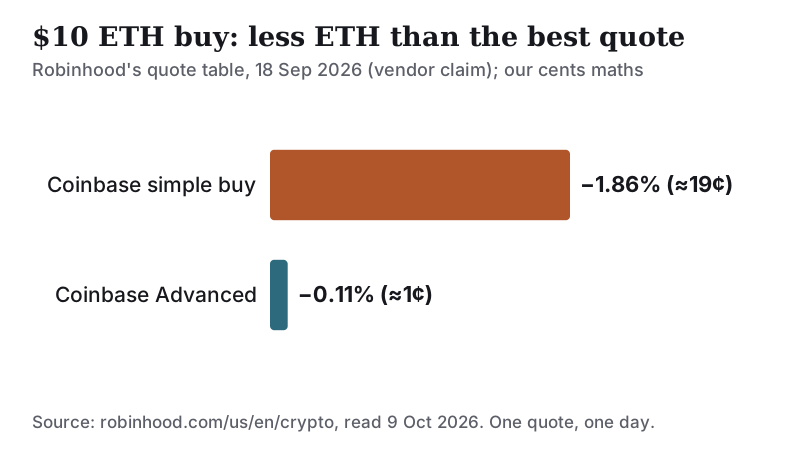
That table shows a $10 ETH purchase: Coinbase's simple screen delivered 0.003770 ETH and Coinbase Advanced 0.003838 ETH. That is about 1.8% more coin on Advanced, roughly 18 cents on $10. It is one small quote on one day, published by a competitor, and a gap measured on $10 need not hold at larger sizes, so treat it as a direction rather than a price. The direction matches Coinbase's own disclosure: the simple screen adds costs that Advanced does not.
The cheapest habit, then, is simple. Fund your account first, open Advanced, and place the order there. For a small, one-off purchase the difference is a few dollars; for regular buying it compounds.
How Advanced fees are tiered
Advanced fees depend on three things: your fee tier, the product, and whether your order adds liquidity or takes it. Coinbase's help page defines the two sides:
- Taker: an order filled immediately at the market price, such as a market order or a limit order that matches at once. It pays the taker fee.
- Maker: an order that does not fill immediately and rests on the order book, such as a buy limit below the current price. It pays the maker fee when it fills.
- Partly matched: the part that fills at once pays taker; the rest pays maker when it fills.
Your tier is set by whichever criterion favours you most: 30-day trading volume, or your USDC balance. Spot, perpetuals and futures, and options each have their own volume thresholds, and stablecoin pairs have a separate schedule. The tier at the moment you place an order decides its fee. Coinbase's Advanced page advertises maker fees "as low as 0.0%", which applies at its highest tiers, not to a new account. Your own rates appear on the Advanced fees page once you sign in, and on every order preview.
Order types and when they matter
On the simple screen, a limit order is a convenience that costs extra. Coinbase charges a separate 1% limit-order execution fee on each simple limit buy and sell, and may also charge a 1.875% Coinbase fee, which varies by payment method. That makes a simple-screen limit order one of the most expensive ways to buy on Coinbase.
On Advanced, a limit order placed away from the current price is the cheapest order you can make, because it pays the maker fee. A market order pays the taker fee and fills at once. If you are not in a hurry, a limit order slightly below the current price earns the lower maker rate; the trade-off is that it fills only if the market comes to your price, and it may not fill at all.
Advanced also offers derivatives through Coinbase Financial Markets, with leverage of up to 10x on eligible products. Coinbase's own page warns that leverage can cause losses larger than your initial investment. You do not need any of that to buy and hold spot bitcoin, and a beginner should leave it alone.
How to switch to Advanced
You do not open a new account. On the web, go to Coinbase Advanced from your signed-in Coinbase account. In the mobile app, Coinbase's transition page says you toggle the Coinbase Advanced option from the main menu.
- Make sure your cash or crypto sits in your main Coinbase balance; Advanced trades from the same balance.
- Switch to Advanced and pick the market, for example BTC-USD.
- Choose limit for the maker fee or market for an instant fill, enter the amount and check the preview.
- Confirm, and check the fee line on the filled order in your history.
To go back, toggle the simple view again. Your holdings do not move; only the screen changes.
Where the paid membership fits
Coinbase One is a monthly subscription that removes Coinbase's trading fee on simple crypto trades, up to a cap. Coinbase's help page lists three tiers: Basic waives fees on up to $500 of simple trades a month, Preferred up to $10,000, and Premium without a cap. In every tier a spread still applies, and Advanced fees, limit-order fees and derivatives are excluded. Preferred and Premium add a 25% rebate on Advanced spot fees, up to 100 USDC a month on Preferred. Coinbase's membership page, read on 10 October 2026, prices Basic at $4.99 a month ($49.99 a year), Preferred at $29.99 a month and Premium at $299.99 a month.
So the membership only pays for itself if you buy often on the simple screen and the fee you save exceeds the subscription. On Basic, that means the Coinbase fee on up to $500 of monthly simple trades has to come to more than $4.99, about 1% of the cap, before the plan breaks even. For most people buying a few hundred dollars a month, using Advanced is a cheaper fix than paying to keep using the simple screen.
Pro login pages are a phishing risk
Because Coinbase Pro is gone, any page, email or ad asking you to "log in to Coinbase Pro" is not taking you to a working Coinbase product. Fake sign-in pages are a common way to steal passwords and two-factor codes. Type coinbase.com yourself or use the official app, and never enter a code someone sends you on a call or in a message. Coinbase disclosed in May 2025 that bribed overseas support staff had stolen customer data, which fuelled impersonation scams; its 2025 annual report says it paid $311.2 million in cash that year on reimbursements and legal costs. The safest rule is that real support never asks you to move funds.
Which Coinbase screen to use
Use the simple screen for your first, small buy if the order book feels unfamiliar, and accept that you are paying a few dollars for that ease. Move to Advanced once you are comfortable; a limit order there is the cheapest way to buy on Coinbase. Only pay for Coinbase One if you have checked that its fee waiver beats the subscription for your actual buying pattern. To see how Coinbase compares with other exchanges on the same logic, read Coinbase vs Kraken or our method for comparing exchanges.
Affiliate link. We may earn a commission if you sign up — it never decides who wins a comparison. Check current terms and eligibility in your country.
Edge cases worth knowing
- You still have Pro API keys or a bot. Coinbase pointed Pro API users to the Advanced API. Set up keys there rather than relying on old Pro credentials.
- You need old Pro statements for taxes. Coinbase said Pro history was available until the end of 2023. If you did not download it, contact Coinbase support through the app.
- You trade stablecoin pairs. They run on a separate fee schedule; check it on the Advanced fees page.
- You hold a large USDC balance. Your fee tier can be set by your balance instead of volume, which may put you in a cheaper tier than your trading suggests.
- You use simple limit orders out of habit. The 1% execution fee applies even to Coinbase One members. Switch those orders to Advanced.
A crypto balance can drop sharply in value, and any money you put in can be lost in full. This page explains fees; it is not financial or investment advice.
Coinbase vs Coinbase Advanced: quick answers
Does Coinbase Pro still exist?
Is Coinbase Advanced cheaper than regular Coinbase?
What are Coinbase Advanced fees?
Do I need a separate account for Coinbase Advanced?
Does Coinbase One make simple trades free?
Still deciding? See how to compare crypto exchanges for the full method, or browse every head-to-head. None of this is financial advice.