Head-to-head
Kraken vs Kraken Pro: What's Different and Which to Use
Kraken and Kraken Pro are two front ends to the same Kraken account, and the difference is mostly price. Kraken Pro is cheaper for nearly every trade: on 9 October 2026 its entry-tier fees were 0.40% for limit orders and 0.80% for market orders, with no spread, while the simple Kraken app charged 1% on instant and recurring buys (1.5% on custom orders) plus a spread it does not publish. Stay in the simple app only for your first small buys, or if you pay for Kraken+, which waives the app's trading fee on up to $10,000 a month. Every other ranking page we checked still quotes Pro fees Kraken no longer charges; the figures here come from Kraken's own fee schedule.
Kraken links on this page are affiliate links. The advice is the same with or without them: the cheaper screen is the one you should learn.
Short answer: same account, two price lists
Kraken's own FAQ answers the basic question: there is no need to upgrade your account to use Kraken Pro, and "if you use Kraken, you can use Kraken Pro". Behind the scenes it is the same order book and the same security. What changes is the screen you trade from and the way you pay.
The simple Kraken app is built for buying and selling in a few taps, plus recurring buys. You pay a flat percentage fee, and the price you see also includes a spread. Kraken Pro, on the web or in its own mobile app, puts you on the order book. You pay a maker or taker fee, and Kraken's FAQ says there are no hidden spreads. Pro also adds charts, more order types, margin, derivatives where available, and staking in one view.
Fees on the same trade
Kraken's fee schedule, read through a US connection on 9 October 2026, sets out both price lists:
- Kraken app: 1% on instant and recurring buys and sells, 1.5% on custom orders. The price "includes a spread", which varies with volatility, asset, order size and account activity, and Kraken may keep any excess.
- Kraken Pro, Tier 1: 0.40% maker, 0.80% taker, for anyone under $2,500 of 30-day spot volume.
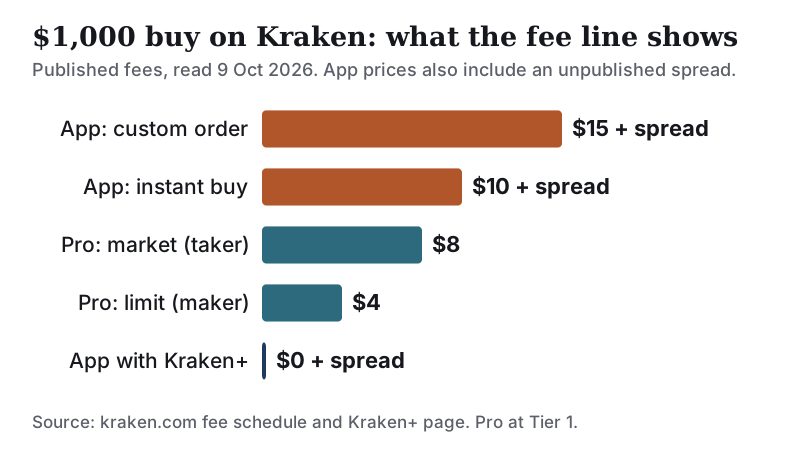
On a $100 bitcoin buy, the app's fee is $1 plus the spread; a Pro market order costs $0.80 and a Pro limit order $0.40. On $1,000, the app takes $10 plus the spread, Pro $8 or $4. The app's spread is the part you cannot see in advance, which is why the gap is usually wider than the fee lines suggest.
One more rule tilts things toward Pro over time. Kraken says volume from Instant Buy does not count toward your 30-day volume. Every dollar you buy through the simple app leaves your Pro fee tier where it was, so habitual app buyers never earn a discount.
Pro's maker and taker tiers, dated
Kraken Pro's fee falls as your 30-day spot volume rises. Since Kraken introduced cross-platform fee tiers, your tier is set by the better of your spot volume or your assets held on Kraken, from Tier 3 up. The first six tiers cover almost every individual buyer:
| Tier | 30-day spot volume | Or assets on Kraken | Maker | Taker |
|---|---|---|---|---|
| Tier 1 | $0+ | n/a | 0.40% | 0.80% |
| Tier 2 | $2,500+ | n/a | 0.30% | 0.60% |
| Tier 3 | $10,000+ | $20,000 | 0.22% | 0.38% |
| Tier 4 | $25,000+ | $50,000 | 0.20% | 0.35% |
| Tier 5 | $50,000+ | $100,000 | 0.15% | 0.30% |
| Tier 6 | $100,000+ | $200,000 | 0.12% | 0.25% |
The schedule continues down to 0% maker and 0.10% taker at $10 million of monthly volume, which is not relevant to most readers. What matters is that the entry rates have risen. Pages that still quote Kraken Pro at 0.16% / 0.26%, or 0.25% / 0.40%, are describing an older schedule. At 0.40% / 0.80%, Pro is still cheaper than the app, but by less than many guides imply.
The asset-based route deserves a caution. Qualifying for Tier 3 by holding $20,000 on Kraken lowers your fees, but it also means keeping that much on an exchange. For long-term savings, a wallet you control is the safer home, and the fee saving rarely justifies the custody risk.
Where the paid membership fits
Kraken+ is Kraken's paid membership. Its page, read on 9 October 2026, offers a free 30-day trial and then $4.99 a month, cancellable at any time. The headline benefit is zero trading fees on up to $10,000 a month of buys, sells and converts in the Kraken app. Kraken's fee schedule adds the catch: while trading fees are waived, spreads and card processing fees still apply. The waiver covers the simple app, not the Pro order book.
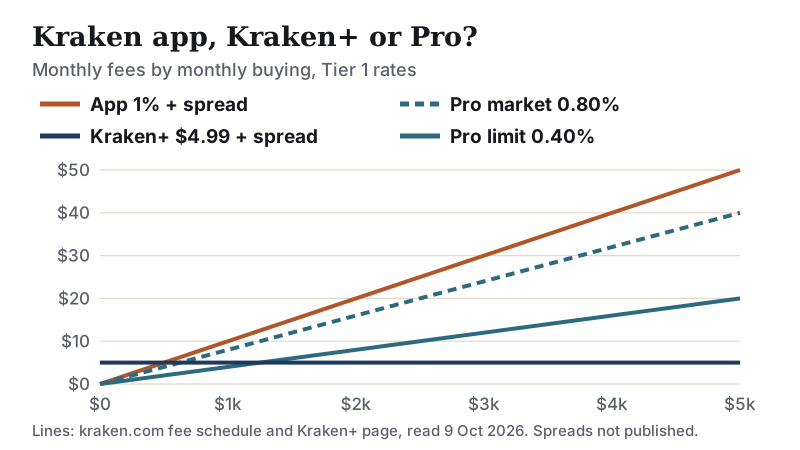
The arithmetic is simple. At $4.99 a month, Kraken+ costs less than the app's 1% fee once you buy more than about $500 a month. It undercuts Pro limit orders at 0.40% only above about $1,250 a month, and Pro market orders above about $625. Those crossovers ignore the app's spread, which Kraken+ does not remove, so the true break-even against Pro is higher. For a monthly buyer of a few hundred dollars, Pro limit orders are cheaper without a subscription.
Features only in Pro
Kraken Pro adds tools the simple app does not have. Kraken lists advanced order types including stop loss, take profit, IOC (immediate or cancel), reduce-only and trigger orders, full charting with technical indicators, live order books, and customisable layouts with more than 25 widgets. It also brings spot, margin, derivatives and staking into one portfolio view.
For a buyer who simply wants bitcoin, only one of those matters: the limit order, which earns the maker rate. Margin and derivatives magnify losses as well as gains, can liquidate a position, and are not needed to buy and hold. Kraken's own disclaimer warns that some crypto products are unregulated and that markets can lead to loss of funds.
Switching and funding
You do not open a second account. Sign in to Kraken Pro on the web, or install the Kraken Pro app on iOS or Android, with your existing Kraken login. Your balances are the same.
- Fund your account. In the US, ACH via Plaid is free with a $1 minimum and lands almost instantly for trading, but carries a seven-day hold before you can withdraw. A FedWire deposit is free and has no hold.
- Open the BTC/USD market in Pro and choose a limit order for the maker rate, or market for an instant fill.
- Check the fee estimate on the order ticket, then submit.
- When you are ready to hold long term, withdraw to your own wallet. Kraken shows the withdrawal fee before you confirm.
Avoid funding with a debit card for routine buys: Kraken charges $0.25 plus 3.75%, with a 72-hour withdrawal hold. The same hold applies to PayPal, Apple Pay and Google Pay deposits.
Who should use Kraken Pro
Anyone buying more than once, or more than a token amount, should use Pro. A limit order at 0.40% costs less than half the app's 1% fee before the app's spread is even counted, and every Pro trade builds toward a lower tier. If you are comparing Kraken with other exchanges on the same basis, our Kraken vs Gemini and Coinbase vs Kraken pages apply the same method.
Affiliate link. We may earn a commission if you sign up — it never decides who wins a comparison. Check current terms and eligibility in your country.
Edge cases worth knowing
- You live in New York or Maine. Kraken does not serve residents of either state, per its support page updated 30 September 2026.
- You only use recurring buys. They are charged at the app's 1% plus spread, unless you have Kraken+ and stay under $10,000 a month.
- You want to stake. Kraken relaunched US staking in January 2025, for 37 states and two territories at launch. Check eligibility for your state in the app.
- You are in the EU. Kraken's EU entities are MiCA-authorised by the Central Bank of Ireland since 25 June 2025, and EUR deposits by SEPA are free.
- You plan to hold assets on Kraken to reach Tier 3. That lowers fees but raises your exposure to the exchange. Keep long-term holdings in your own wallet.
Crypto can lose value fast, and you could lose everything you invest. This page compares fees; it is not financial or investment advice.
Kraken vs Kraken Pro: quick answers
What is the difference between Kraken and Kraken Pro?
What are Kraken Pro fees in 2026?
Is Kraken Pro free to use?
Is Kraken+ worth it?
Do I need a separate account for Kraken Pro?
Still deciding? See how to compare crypto exchanges for the full method, or browse every head-to-head. None of this is financial advice.